Supercharge Your Creative Visuals with Brainstorm Concept 3D Assets
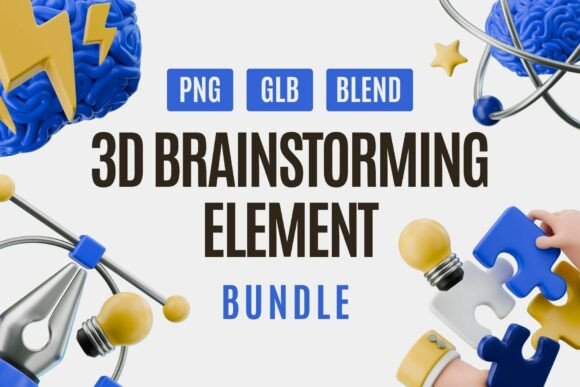
Are you a designer, educator, or content creator looking to elevate your visual storytelling? The Brainstorm Concept 3D Assets bundle is your gateway to more dynamic, engaging, and professional visuals. This curated collection brings together essential elements like brains, light bulbs, puzzle pieces, pens, and abstract icons—all rendered in a clean, modern 3D style. Whether you're crafting a presentation, designing a website, or developing marketing materials, these assets are engineered to spark inspiration and bring your ideas to life.
Why 3D Matters in Modern Design
In today's fast-paced digital landscape, visuals need to stand out and communicate effectively. 3D elements offer a level of depth, realism, and interactivity that flat graphics simply can't match. The Brainstorm Concept 3D Assets pack is built with this in mind, combining soft lighting, glossy materials, and smooth color transitions to create visuals that pop and engage audiences.
Designers are increasingly turning to 3D because it allows for greater flexibility and realism. Whether you're illustrating a concept for a tech startup or visualizing a collaborative brainstorming session, 3D assets help you tell your story more compellingly.
Inside the Brainstorm Concept 3D Assets Bundle
This bundle is packed with high-quality 3D icons and objects that are both visually striking and functionally versatile. Here’s a closer look at what you’ll find:
- Brains: Represent creativity, thinking, and innovation.
- Light Bulbs: Perfect for highlighting ideas or breakthroughs.
- Puzzle Pieces: Ideal for illustrating teamwork and problem-solving.
- Pens: Symbolize writing, planning, and design.
- Abstract Thinking Icons: Great for visualizing complex concepts.
Each model is crafted with realistic textures and professional lighting, ensuring your visuals maintain a polished and cohesive look across platforms and media types.
Flexible Formats for Every Workflow
One of the standout features of the Brainstorm Concept 3D Assets is its format versatility. You get assets in three formats: PNG, GLB, and BLEND. This gives you the freedom to choose how you want to use them, whether you're working in a 2D environment or diving into full 3D customization.
- PNG: Ready-to-use for quick compositions in tools like Canva, Figma, or Photoshop.
- GLB: Lightweight 3D models that can be embedded directly into websites or apps.
- BLEND: Full Blender project files for deep customization in 3D software.
This flexibility makes the bundle ideal for a wide range of projects—from static presentations to interactive web experiences.
Applications Across Industries
The Brainstorm Concept 3D Assets are not limited to a single use case. Their universal design and thematic relevance make them suitable for multiple industries and creative scenarios.
Presentations and Education
Whether you're a teacher explaining a complex concept or a business leader pitching a new strategy, these 3D visuals can help simplify and enhance your message. Use them to illustrate processes, highlight key points, or make your slides more engaging and memorable.
Web and App Design
Modern web and app interfaces demand high-quality visuals that communicate functionality and creativity. These assets are perfect for landing pages, feature sections, or onboarding flows where you need to visually represent innovation and teamwork.
Marketing and Advertising
In marketing, visuals are often the first point of contact between your brand and your audience. Using the Brainstorm Concept 3D Assets, you can create compelling social media graphics, ad banners, and campaign visuals that capture attention and convey your message clearly.
UI/UX Prototyping
For UI/UX designers, these icons and elements offer a ready-made library of visuals that can be integrated into wireframes, mockups, and prototypes. They help communicate functionality and user interaction in a visually appealing way.
Practical Benefits for Designers and Creators
Using pre-built 3D assets like the Brainstorm Concept 3D Assets offers several practical advantages:
- Time-Saving: Skip the modeling phase and jump straight into design with ready-to-use assets.
- Consistency: All elements share a unified visual style, making it easy to maintain design harmony.
- Customization: With BLEND files, you can tweak lighting, materials, and scene settings to match your brand or project needs.
- Scalability: High-resolution assets ensure crisp visuals across all screen sizes and resolutions.
These benefits make the bundle an excellent investment for both individual creators and teams working on time-sensitive or high-volume projects.
How to Get the Most Out of These Assets
Here are a few tips to help you integrate the Brainstorm Concept 3D Assets into your workflow effectively:
- Start with a Purpose: Know what message or concept you want to convey before choosing your assets.
- Combine with Branding: Adjust colors and materials in the BLEND files to match your brand palette.
- Use in Context: Pair assets with relevant copy and supporting visuals to reinforce your message.
- Test Across Devices: Ensure your visuals look sharp on mobile, tablet, and desktop displays.
Whether you're building a concept board, designing a landing page, or creating a product demo, these assets can be the visual cornerstone of your project.
Choosing the Right Tools
To make the most of the Brainstorm Concept 3D Assets, it's important to pair them with the right tools. For quick design work, use the PNG files in Canva, Figma, or Adobe XD. For more advanced 3D integration, Blender is the ideal platform, especially when working with the BLEND files.
If you're new to 3D design, start with the GLB files, which can be embedded directly into web pages or apps using tools like Three.js or A-Frame. This allows you to add interactive elements without needing deep 3D expertise.
Final Thoughts
The Brainstorm Concept 3D Assets bundle is more than just a set of graphics—it's a toolkit for visual storytelling. By combining high-quality 3D elements with flexible formats and real-world applications, it empowers creators to communicate ideas more effectively and professionally.
Whether you're a seasoned designer or just starting out, this bundle offers something valuable for every project. It’s a smart investment that not only enhances your visuals but also streamlines your workflow, helping you deliver more impactful content with less effort.